Step 01 · roughly ten minutes
Install UE4SS
UE4SS is the Unreal Engine 4/5 Scripting System: a loader that injects into a running Unreal game and exposes its object system to Lua scripts, C++ mods, blueprint mods, a live property editor and a set of dumpers. For Beach Invasion 1944 it is the standard way any Lua-based mod gets loaded — and it is the tool that produced the reflection dump the Ungodly AI mod was built against.
Find the game executable directory
Almost every failed install is a right file in the wrong folder. Get this bit right and the rest is drag and drop.
Unreal games have two folders that look like candidates. The outer one holds a small
wrapper executable; the real game lives further in. You want the inner one — the folder
containing BeachInvasion1944-Win64-Shipping.exe.
The quickest route in Steam:
- Right-click Beach Invasion 1944 in your library
- Choose Manage → Browse local files
- Explorer opens at the game root. From there open
BeachInvasion1944→Binaries→Win64
On a default install that lands you at:
C:\Program Files (x86)\Steam\steamapps\common\BeachInvasion1944\BeachInvasion1944\Binaries\Win64\On a second drive or a custom Steam library it looks like the path below — which is the one in the screenshots on this site:
F:\SteamLibrary\steamapps\common\BeachInvasion1944\BeachInvasion1944\Binaries\Win64\
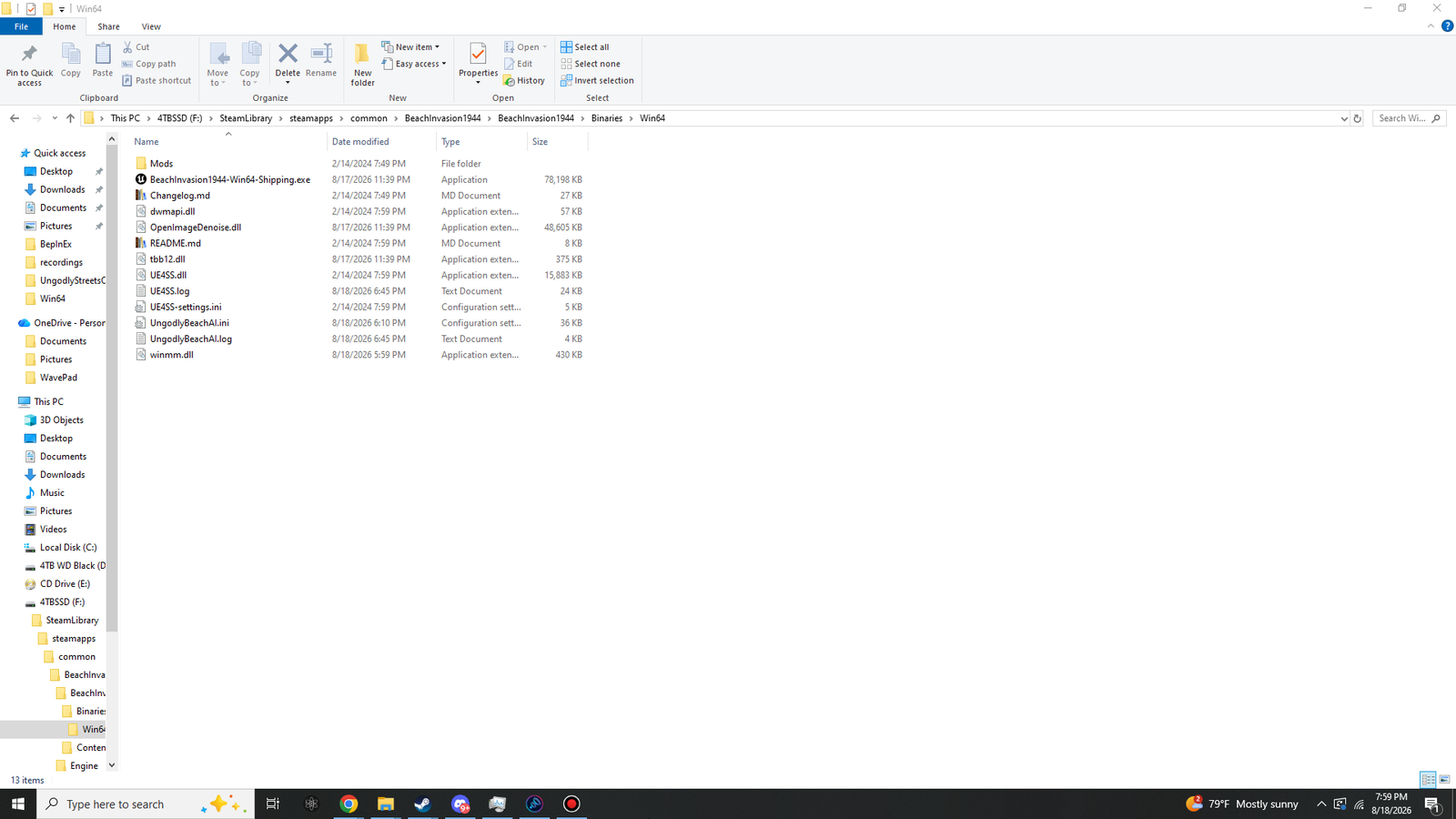
You are in the right place when you can see BeachInvasion1944-Win64-Shipping.exe
sitting there — roughly 76 MB, and much larger than the wrapper you passed on the
way in. Here is that folder with everything already installed:
Know the four directory ideas
UE4SS documentation uses these four terms constantly. Two minutes here saves confusion later.
- Game directory
- The outer folder, holding a small wrapper executable and a folder named after the game. Not where UE4SS goes.
- Game executable directory
- The
Binaries\Win64folder holding the real, large executable. This is where the proxy DLL must live, always. - Root directory
- Wherever
UE4SS.dllitself sits. In a basic install this is the same folder as the executable. - Working directory
- Wherever
UE4SS-settings.ini,Mods\andUE4SS.logsit. In a basic install this is also the same folder.
For a single game, all three of the last ones collapse into one folder, and that is what this guide does. UE4SS also supports a central install shared across many games, where the root and working directories live elsewhere — the official installation guide covers that, and it is unnecessary here.
Download the right build
Four downloads are offered and only one of them is the one you want.
Go to the latest UE4SS release on GitHub and open the Assets list at the bottom of the release notes. The current stable release is v3.0.1.
| Asset | Who it is for | Take it? |
|---|---|---|
UE4SS_v3.0.1.zip |
Players. No console windows, quiet defaults. | Yes — this one. |
zDEV-UE4SS_v3.0.1.zip |
Mod developers. Extra tools, console and GUI visible by default. | Only if you intend to dump or debug. |
| Experimental builds | Latest commits, newer engine support, more bugs. | Not needed. UE4 4.27 is long-settled ground. |
| Source archives | People compiling it themselves. | No. |
Extract the contents into Win64
Contents, not the folder containing them. This is the single most common mistake.
Open the zip and copy what is inside it directly into the Win64 folder from step 01.
You should end up with the files themselves next to the executable — not a folder called
UE4SS_v3.0.1 holding them.
Binaries\Win64\
├── BeachInvasion1944-Win64-Shipping.exe   ← already there
├── Mods\                                  ← from the zip
├── Changelog.md                           ← from the zip
├── README.md                              ← from the zip
├── UE4SS-settings.ini                     ← from the zip
├── UE4SS.dll                              ← from the zip
└── dwmapi.dll ← from the zipThese are the six items the zip contributes, and what each one is for:
- Mods — UE4SS Where UE4SS Lua and blueprint mods live. Ships with a few built-in ones and a mods.txt load list.
- Changelog.md 27 KB UE4SS UE4SS release notes. Harmless, and safe to delete if you like a tidy folder.
- dwmapi.dll 57 KB UE4SS UE4SS proxy loader. The game loads this at startup, and it loads UE4SS.dll.
- README.md 8 KB UE4SS UE4SS readme. Also safe to delete.
- UE4SS.dll 15,883 KB UE4SS UE4SS itself. The big one — if this is missing, nothing UE4SS-related works.
- UE4SS-settings.ini 5 KB UE4SS UE4SS configuration. Console visibility, hotkeys, graphics API, object cache.
Launch and verify it loaded
Do not tune anything yet. Prove it is running first.
Start the game normally through Steam. Then, back in the Win64 folder, look for a new file:
UE4SS.log
A fresh UE4SS.log with a current timestamp is your proof. Open it — the top
should report the engine version it detected and the addresses it resolved, with no lines
reading failed or Could not find.
Two other quick confirmations:
- In game, press F10 or @ to open the console that UE4SS's built-in
ConsoleEnablerModunlocks. - Enable the GUI console in
UE4SS-settings.iniand check that a separate window appears.
Settings worth knowing about
Three lines in UE4SS-settings.ini fix nearly every problem people hit with the 3.0.x releases.
UE4SS-settings.ini is plain text — open it in Notepad or anything similar.
Change one thing at a time and relaunch, so you always know what caused what.
; The GUI console window comes up blank or white
GraphicsAPI = dx11

; The game crashes on startup with UE4SS installed
bUseUObjectArrayCache = false

; Show the UE4SS console window (dev builds have this on already)
GuiConsoleEnabled = 1
GuiConsoleVisible = 1
There is also a launch argument worth remembering. Adding it to Steam's launch options starts the game with UE4SS dormant, without uninstalling anything:
--disable-ue4ssRemove the argument again to re-enable it. This is a much better first diagnostic step than deleting files when you are trying to work out whether UE4SS is involved in a problem.
Adding UE4SS mods later
The Mods folder, and the load list that controls it.
UE4SS mods go into the Mods\ folder that came out of the zip. Each mod is its
own subfolder, and a plain-text mods.txt in the same directory controls which
ones load and in what order.
Mods\
├── mods.txt                    ← the load list
├── ConsoleEnablerMod\          ← built in
├── ConsoleCommandsMod\         ← built in
└── SomeModYouDownloaded\
    └── Scripts\
└── main.luaConsoleEnablerMod : 1
ConsoleCommandsMod : 1
SomeModYouDownloaded : 1
; 1 loads the mod, 0 skips it.
; The folder name here must match the folder name on disk exactly.Removing or pausing UE4SS
Nothing here is permanent.
Pause it for one session: launch with --disable-ue4ss.
Disable it without deleting: rename the proxy so Windows stops loading it.
dwmapi.dll → dwmapi.dll.bakRemove it completely: delete the files the zip added.
dwmapi.dll
UE4SS.dll
UE4SS-settings.ini
UE4SS.log
Changelog.md
README.md
Mods\  (the whole folder)